This website is built using Gatsby, which is a very nice static site generator. The posts within are MDX documents with a little YAML frontmatter for things such as title and description. All in all, it’s very simple once configured.
One small pain point is the new blog post procedure, insofar as there isn’t one. If I want to write a new post I need a new folder in content/blog which is named such that it will make an appropriate slug, within which will be contained an index.mdx file with aforementioned frontmatter in a format like so:
---
title: "A New Post"
pubDate: "2021-11-18"
description: "Scripting the Gatsby new blog post experience"
heroImage: ""
heroImageAlt: ""
---
Obviously, doing this manually is almost as bad as working in a coal mine. What I want is an automated way to have the folder, document and frontmatter created for me so I can just start banging away. And so you shall. I have been reading far too much Spinderella to my kids
Following inspiration from a couple of sources, I have created a script which suits me perfectly. The following is a brief outline and of course, the script itself.
Previous iterations of this site also had a new post script which was, fundamentally, this one by Joel Hooks. This time around I have gone for more interactivity, and I may build upon this with further frontmatter changes in future (such as pubished/not published, last modified date and so on).
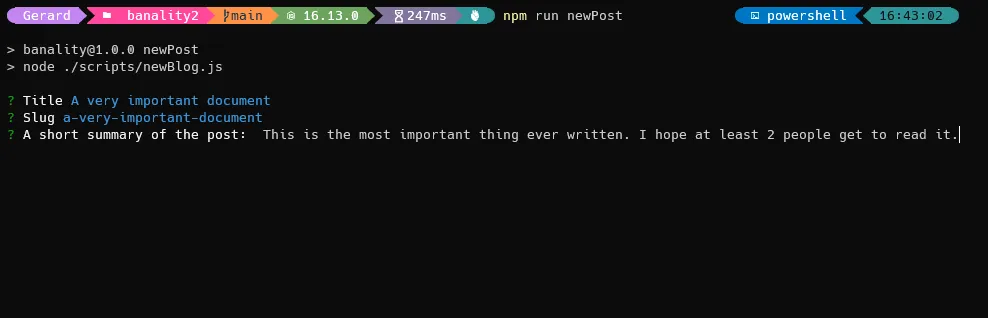
Inspiration (well, more than inspiration really) from the wonderfully named Gerard Ketuma. The script uses inquirer to ask a couple of questions in the command line before creating the path and auto filling the frontmatter based on the answers to the prompts.
Inquirer is a very popular package—at the time of writing this it was getting more than 20 million downloads per week. Likely you will have seen prompts like this if you use cli tools to any degree.
#! /usr/bin/env node

const fs = require("fs");
const slugify = require("slug");
const inquirer = require("inquirer");
const open = require("open");
const dateFns = require("date-fns");

(async () => {
  try {
    const answers = await inquirer.prompt([
      {
        type: "input",
        name: "title",
        message: "Title",
      },
      {
        type: "input",
        name: "slug",
        default: (answers) => slugify(answers.title.toLowerCase()),
        message: "Slug",
      },
      {
        type: "input",
        name: "desc",
        message: "A short summary of the post: ",
      },
    ]);

    const { title, slug, desc } = answers;

    const date = dateFns.format(new Date(), "YYY-MM-dd");
    const path = `./content/blog/${slug}`;

    if (!fs.existsSync(path)) {
      fs.mkdirSync(path, { recursive: true });
    } else {
      throw "There is already a post with that title.";
    }

    fs.writeFileSync(
      `${path}/index.mdx`,
      `---
title: '${title}'
pubDate: '${date}'
description: '${desc}'
heroImage: ""
heroImageAlt: ""
---


`
    );

    console.log(`\n${slug} was created!`);
  } catch (error) {
    console.log({ error });
  }
})();
The script is saved at scripts/newPost.js. I have also added the following to my package.json:
"scripts": {
    ...
    "newPost": "node ./scripts/newPost.js"
  },
So now I can type npm run newPost into my command line and the script is run, the questions are asked, and the post is created.